
Description
Search metadata and AI discovery, in one lightweight WordPress plugin.
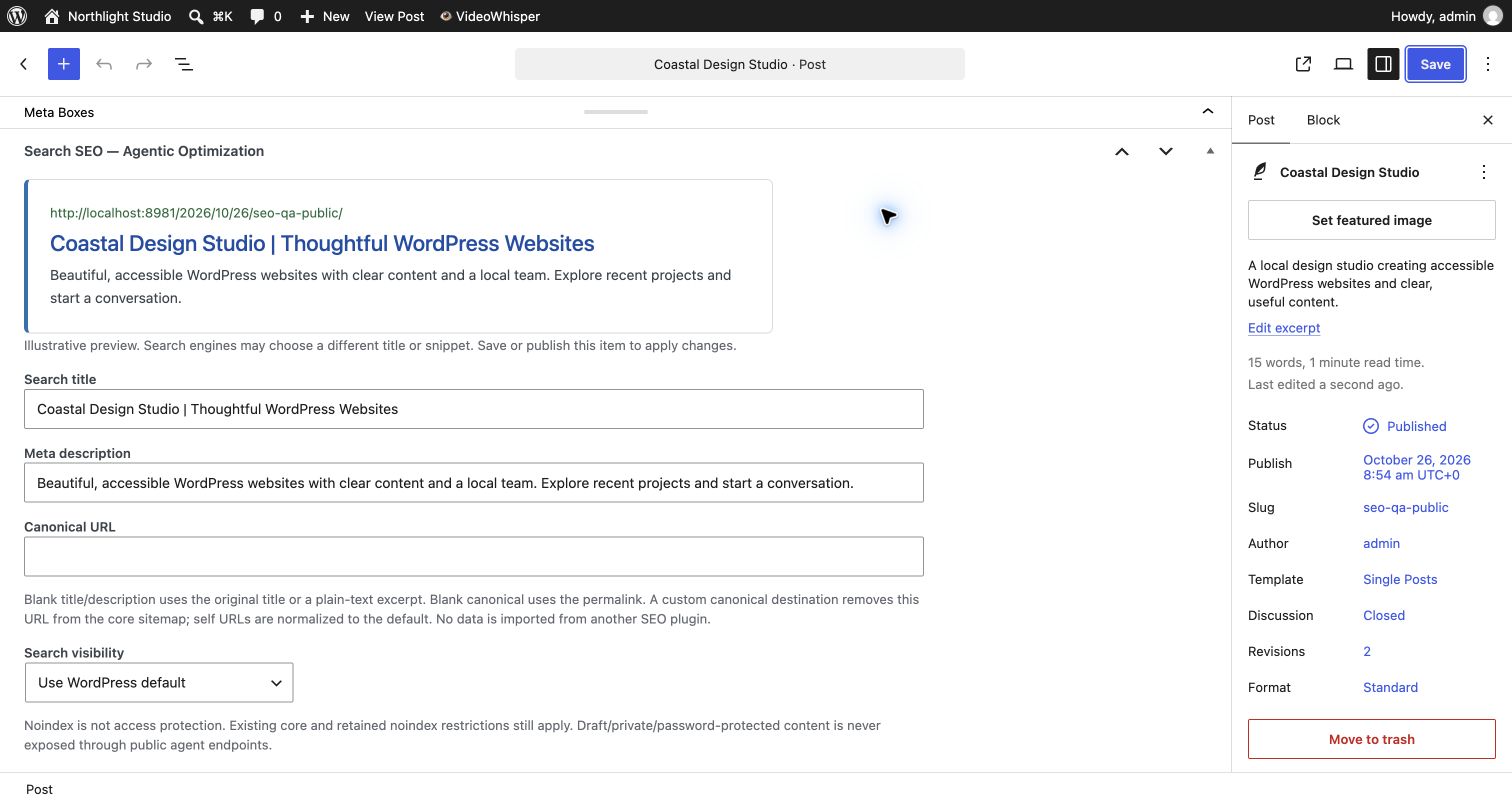
Give each public post or page a clear search title, useful description, canonical URL and indexing preference. The optional local SEO editor includes a search-result preview, works with the normal WordPress publishing workflow, and requires no external service, account or API key.
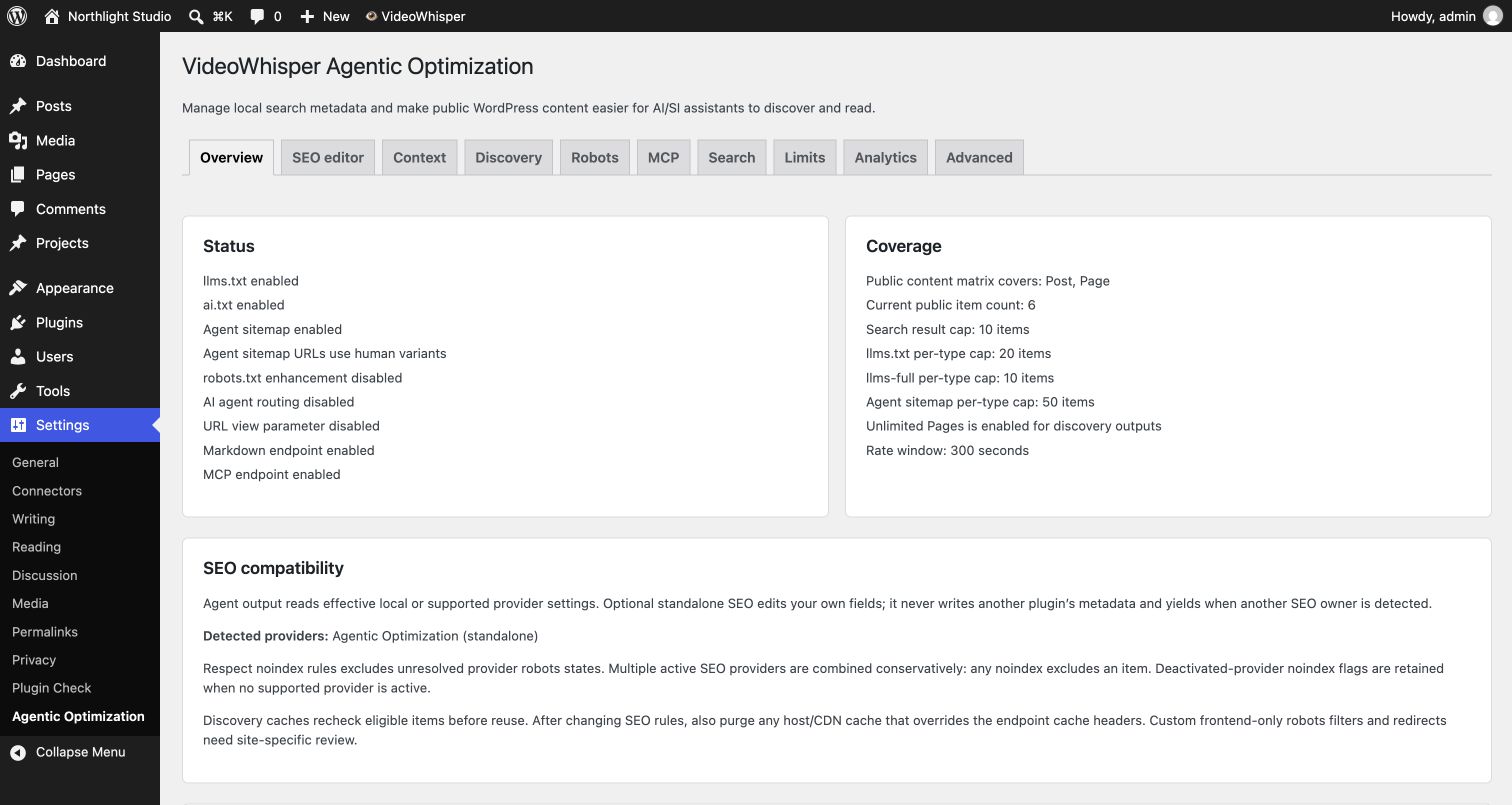
Alongside search SEO, publish llms.txt, clean Markdown, discovery files and structured public content for AI/SI assistants. Your public agent endpoints remain read-only. Draft, private and password-protected content stays excluded.
One SEO output owner. Standalone rendering is off until you enable it. When a supported SEO plugin is active, Agentic Optimization automatically yields instead of adding competing tags. It reads reviewed provider settings for discovery and leaves their metadata untouched. Native WordPress title, canonical and robots output is reused; the plugin adds one description when it owns output.
Features in the free plugin:
- Optional local search-title, description, canonical and noindex editing on posts, pages and public custom content types
- Local search-result preview with no external generation or tracking request
- Normal WordPress edit/publish permissions and object-specific save protection
- Core sitemap exclusions for noindex, protected content and custom canonical destinations when standalone mode is active
- Automatic output ownership detection for Yoast SEO, Rank Math, AIOSEO, SEOPress, The SEO Framework and Site Manager standalone SEO; developer hooks for other renderers
- Effective noindex settings from WordPress and reviewed Yoast, Rank Math, AIOSEO and SEOPress readers
-
Fresh eligibility checks before reusing discovery caches, including metadata-only updates
-
Root-level
llms.txt - Optional root-level
llms-full.txt - Optional
/.well-known/ai.txtand/ai.txtguidance for AI-agent discovery - Root-level
agent-sitemap.xml - Optional WordPress
robots.txtenhancement with discovery hints - Optional AI-agent user-agent routing from public content pages to the markdown view
- Optional public URL format switcher with
?vwao_view=markdown,json,html, orclean - Optional agent sitemap mode that lists public markdown variant URLs such as
?vwao_agent=1 - Public REST search, content, markdown, comments, categories, tags, and site info endpoints
- Read-only MCP endpoint with search, content, comments, taxonomy, and site info tools
- Optional WordPress 6.9+ Abilities for public search, markdown, site info, public taxonomy/comments, and discovery endpoint reads
- Optional exposure of those abilities through the official WordPress MCP Adapter when installed separately
- Hard request caps and transient-based rate limiting
- Privacy-friendly analytics with aggregate counts and hashed IP logs only
- Admin-managed site description and site details for llms.txt context
- SEO-aware content exclusion hooks for common noindex patterns
- Extension points for future add-ons and custom integrations
- Formatter and admin hooks for add-ons that extend post type coverage or editorial agent overrides
The plugin is intentionally conservative:
- Public agent APIs remain read-only; local SEO editing stays in the authorized WordPress editor
- Public content only in agent endpoints
- No drafts, private content, or pending comments
- Comments exposure disabled by default
- Standalone SEO rendering and MCP disabled by default
- WordPress Abilities registration and MCP Adapter exposure disabled by default
- Analytics disabled by default
External Services
This plugin generates agent-optimized discovery files and sitemaps using standard XML formats.
Sitemaps.org XML Schema
The agent-sitemap.xml output uses the standard sitemap XML namespace (http://www.sitemaps.org/schemas/sitemap/0.9) and a custom extension URN namespace (urn:videowhisper:agentic:1.0). These are identifier strings embedded in locally generated XML documents only. No data is transmitted to external services when the sitemap file is generated or served.
- sitemaps.org protocol reference: https://www.sitemaps.org/protocol.html
Screenshots
Installation
- Upload the plugin folder to
/wp-content/plugins/. - Activate VideoWhisper Agentic Optimization in the WordPress admin.
- Go to
Settings > Agentic Optimization. - Enable the discovery outputs and APIs you want to expose.
- Save settings to publish your selected endpoints.
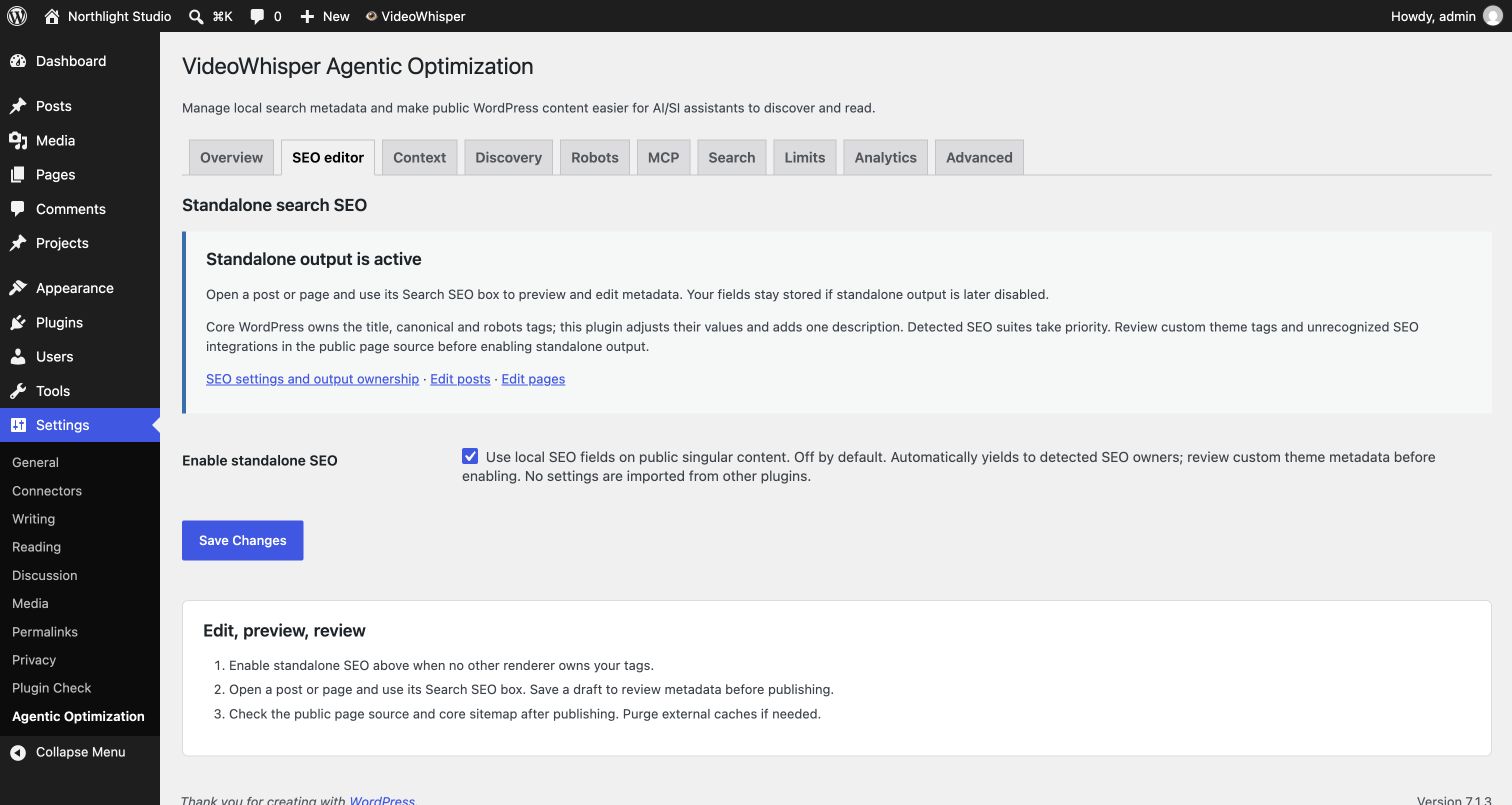
- Optionally open SEO editor, review output ownership, and enable standalone SEO when no other renderer owns your tags.
- Edit a post or page, use its Search SEO box, preview the fields and save a draft or publish through WordPress. Review the public page source and sitemap after publishing. Purge host/CDN caches if they override response headers.
FAQ
-
Can I use this as a standalone SEO option?
-
Yes, for lightweight per-item search titles, descriptions, canonical URLs and noindex. Enable it on the SEO editor tab, then use the Search SEO box in the post/page editor. Public custom content types can use these basic SEO fields without an add-on. Agent endpoint exposure is configured separately.
Updating a published item applies its SEO changes live. Use the normal draft workflow for new content.
It reuses WordPress core title, canonical, robots and search sitemaps. It does not add a competing sitemap engine, schema graph, social-card generator or a complete archive SEO suite. Preview text is illustrative: search engines may choose a different title/snippet or canonical. No ranking or AI-citation outcome is guaranteed.
-
Standalone output pauses automatically for detected Yoast SEO, Rank Math, AIOSEO, SEOPress, The SEO Framework and Site Manager standalone SEO. Stored local fields are retained and no other plugin’s data is imported or overwritten. Core title/canonical/robots tags are filtered rather than printed again.
Custom themes and unrecognized integrations can still print their own tags; review page source before enabling and use the documented
vwao_seo_output_ownersdeveloper filter to declare another owner. Output-owner detection is broader than the four reviewed metadata readers; an unresolved owner fails closed for public agent indexing while Respect noindex rules is enabled. -
What happens to noindex and canonical URLs?
-
Noindex adds an indexing preference without removing core or retained restrictions; it is not a password or access rule. Standalone mode keeps noindex/protected items out of core post sitemaps. With Respect noindex rules enabled (the default), public agent endpoints also exclude noindex items; private, draft and password-protected content is always excluded. A custom canonical destination excludes the source URL from the core sitemap; leave canonical blank to use the normal permalink. Self URLs are normalized to the default. Historical noindex flags remain conservative opt-out hints when no supported SEO provider owns the settings.
-
Are my fields sent to an AI service?
-
No external service is required or called by the local SEO editor or preview. External assistants only receive public content when a client requests an enabled public endpoint. The optional MCP Adapter is installed separately. No write tool or generic ability executor is added.
-
Which SEO plugins can it read?
-
It reads WordPress search visibility and per-item/inherited robots settings from Yoast SEO, Rank Math, All in One SEO and SEOPress. Known noindex and unavailable supported-provider states are excluded while Respect noindex rules is enabled. Multiple providers are combined conservatively. Historical noindex flags are retained when no supported provider is active. Private, unpublished and password-protected content is always excluded, even if noindex protection is turned off.
The additive JSON
seocontext identifies its provider, resolution status andprovider_settingsscope. Titles, descriptions and canonical URLs use provider data where supported, otherwise editorial/permalink fallbacks. AIOSEO and SEOPress expose explicit fields rather than simulating all frontend templates. This is not a complete SEO suite or an exact simulation of arbitrary theme/frontend robots filters, redirects, headers or paginated URLs. In standalone mode, theseocontext instead reports locally owned metadata withstandalonescope. It never writes another provider’s metadata. Review custom integrations separately.Discovery caches reuse formatting only after checking current eligible items and SEO state. Metadata/settings edits invalidate caches, and stale in-flight builds cannot replace a newer generation. External caches that ignore no-cache headers must be purged separately. No indexing or ranking outcome is guaranteed.
-
What URLs does the plugin create?
-
When enabled, the plugin publishes:
/llms.txt/llms-full.txt/.well-known/ai.txt/ai.txt/agent-sitemap.xml/robots.txt(enhanced virtual output when enabled)/wp-json/videowhisper-agentic-optimization/v1/search/wp-json/videowhisper-agentic-optimization/v1/content/wp-json/videowhisper-agentic-optimization/v1/markdown/<id>/wp-json/videowhisper-agentic-optimization/v1/comments/<post_id>/wp-json/videowhisper-agentic-optimization/v1/site-info/wp-json/videowhisper-agentic-optimization/v1/mcp
-
Can a connected agent write SEO fields through this plugin?
-
No. Public REST/MCP and optional native Abilities remain read-only. Authorized WordPress users can manually edit local SEO fields in the native editor after standalone mode is enabled. This does not add remote write permissions or change another connector’s grants.
-
Does this replace the REST or MCP endpoints?
-
No. WordPress Abilities are optional and additive. Existing REST, MCP, discovery, and OpenAPI-style integration surfaces remain available for clients that use them.
-
Does the plugin include the WordPress MCP Adapter?
-
No. If you want WordPress Abilities exposed to MCP clients through the official adapter, install and configure the WordPress MCP Adapter separately, then enable the Abilities settings in this plugin.
-
How can I test AI-agent routing?
-
Enable AI-agent routing on the Robots tab, then open any public post or page with
?vwao_agent=1appended to the URL. The parameter name can be changed in settings. -
Can agents access the normal human page?
-
Yes. Markdown responses include a human page URL with
?vwao_human=1, which bypasses AI-agent redirects and returns the normal theme-rendered page. -
What does the URL view parameter do?
-
When enabled, public single content URLs can render alternate views with
?vwao_view=markdown,?vwao_view=json,?vwao_view=html, or?vwao_view=clean. Explicit view requests bypass AI-agent redirects. -
Does it track visitors?
-
Analytics are disabled by default. When enabled, the plugin stores aggregate counters and recent event logs with hashed IP values only.
-
Where do I report security bugs found in this plugin?
-
Please report security bugs found in the source code of Agentic Optimization through the Patchstack Vulnerability Disclosure Program. The Patchstack team will assist you with verification, CVE assignment, and notify the developers of this plugin.
Reviews
There are no reviews for this plugin.
Contributors & Developers
“Agentic Optimization – SEO for AI Agents” is open source software. The following people have contributed to this plugin.
Contributors
Translate “Agentic Optimization – SEO for AI Agents” into your language.
Interested in development?
Browse the code, check out the SVN repository, or subscribe to the development log by RSS.
Changelog
1.4.0
- Add an optional local SEO editor and search-result preview for posts, pages and public custom types.
- Reuse core title/canonical/robots output and add a description only when standalone mode owns rendering.
- Automatically yield to detected SEO suites and Site Manager standalone output; preserve stored fields and public read-only permissions.
- Align core post sitemaps with noindex, protected content and custom canonical destinations.
- Keep new rendering off on fresh installs and upgrades; retain SEO data with source content on uninstall.
- Update benefits, setup and screenshots for standalone SEO and AI discovery.
1.3.0
- Read supported SEO provider robots settings, including inherited noindex rules, and WordPress search visibility.
- Add bounded read-only SEO context to public JSON summaries and content, preserving editorial titles and URLs.
- Recheck discovery eligibility before cache reuse; invalidate metadata/settings changes and reject stale cache writers.
- Require WordPress 6.9+ and PHP 8.2+; optional Abilities/MCP and public-only defaults remain unchanged.
1.2.1
- Remove legacy/current public caches on uninstall for each network site.
- Security: exclude password-protected content from public responses and shared caches even when the requester has unlocked it.
1.2.0
- Added optional WordPress 6.9+ Abilities for read-only public content, markdown, site info, taxonomy/comment, and agentic discovery endpoint access.
- Added settings to register WordPress Abilities and mark them public for the official WordPress MCP Adapter without replacing existing REST or MCP endpoints.
1.1.2
- Synchronized plugin version metadata and updated WordPress.org support requirements.
1.0.8
- Added optional
/.well-known/ai.txtand/ai.txtdiscovery guidance for AI agents. - Added configurable AI-agent user-agent routing from public single content pages to the markdown view.
- Added configurable
vwao_agentandvwao_humanURL parameters for agent markdown and human page variants. - Added optional
vwao_view=markdown|json|html|cleanpublic URL view switching. - Added optional agent sitemap mode that lists agent-view markdown URLs.
- Improved robots.txt recommendations with agent API allow lines when related endpoints are enabled.
1.0.4
- Added endpoint-specific public content matrices with per-endpoint discovery exposure and per-type discovery limits.
- Added grouped discovery output for
llms.txt,llms-full.txt, andagent-sitemap.xmlwith improved page, post, and custom post type ordering. - Improved agent markup conversion and fixed plain-text discovery output so markdown blockquotes and other characters are not HTML-escaped.
- Improved admin Discovery reporting and external integration hooks.
1.0.3
- Added:
vwao_post_summaryandvwao_admin_tab_labelhooks so add-ons can extend summaries and admin navigation safely. - Changed: the built-in post type chooser now focuses on posts and pages, while extensions can add custom post type exposure through hooks.
- Bumped stable tag to 1.0.3.
1.0.2
- Changed: REST namespace is now plugin-prefixed as
/wp-json/videowhisper-agentic-optimization/v1/...for WordPress.org compliance. - Bumped stable tag to 1.0.2.
1.0.1
- Fixed: Active settings tab now passed through the Settings API
$inputarray, removing direct POST reads inside the sanitize callback. - Added:
== External Services ==section in readme.txt documenting XML namespace usage foragent-sitemap.xml. - Changed: Custom
agent-sitemap.xmlextension namespace from URL form to URN (urn:videowhisper:agentic:1.0) to avoid implying any external service call. - Bumped stable tag to 1.0.1.
1.0.0
- Initial release.
- Added root-level
llms.txt,llms-full.txt, andagent-sitemap.xml. - Added admin-managed llms.txt context fields and optional robots.txt enhancement.
- Added public REST endpoints for search, content, markdown, comments, terms, and site info.
- Added a read-only HTTP JSON-RPC MCP endpoint.
- Added rate limiting, analytics, settings UI, and extension hooks for future add-ons.