
Description
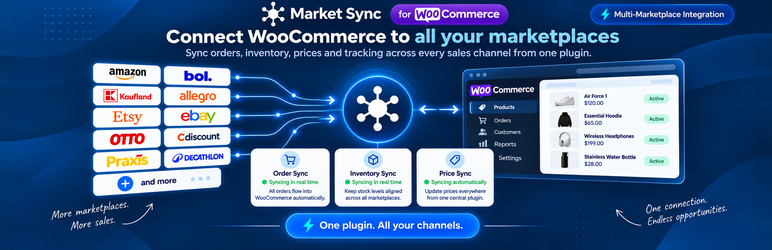
Market Sync connects your WooCommerce store to the Market Sync service, which lists your products on external
marketplaces and keeps them in sync with your store.
Features:
- Home – connection status, setup instructions, sale-channel status, and recent updates at a glance.
- Products – see which products are linked to a marketplace, search and filter your catalog, and review inventory
and price update history per product. - Connections – add, edit, and remove marketplace sale channels, and authorize them with the marketplace.
- Orders – search and filter marketplace orders, review order details, and import or archive orders.
- Settings – check and re-authorize the connection between your store and Market Sync.
Supported marketplaces
Market Sync connects WooCommerce to 26 marketplaces.
Most used
- bol.com – sell your WooCommerce products on bol.com in the Netherlands and Belgium, with stock and price updates and automatic order import.
- Amazon – connect your Amazon seller account to WooCommerce and sync inventory, prices and orders.
- OTTO – list your WooCommerce catalog on otto.de and import OTTO orders straight into your store.
- Kaufland – keep your Kaufland marketplace offers in sync with WooCommerce stock and prices.
- Cdiscount – reach French shoppers by connecting WooCommerce to Cdiscount, including order import.
- Allegro – sell on Allegro, Poland’s largest marketplace, with WooCommerce as your single source for stock and orders.
Mirakl marketplaces
Connect WooCommerce to retailer marketplaces that run on Mirakl, using your Mirakl API key:
- Home & DIY: Adeo, Brico, Hornbach, OBI, Praxis, XXXLutz
- Retail & electronics: Carrefour, MediaMarkt
- Sports & outdoor: Decathlon, Obelink
- Health, beauty & pets: Douglas, Shop Apotheke, zooplus
More marketplaces
- eBay
- Etsy
- TikTok Shop
- Walmart DSV
- Faire (wholesale)
- Pod Foods (wholesale)
- Airgoods
New marketplaces are added regularly.
External services
This plugin connects to the external services below. Nothing is sent to any of them until an administrator
connects the store or, for the support chat, clicks Contact Support.
Market Sync
The Market Sync service (api.market-sync.com) connects your store to marketplaces. It is required: without it,
the plugin has no functionality.
- What is sent: your store’s domain, URL, currency, and locale, the plugin, WordPress, and WooCommerce
versions, and an authorization token when you connect the store; your WooCommerce product catalog (including
stock and prices) so it can be synced with your marketplaces; the credentials you enter when you add or edit a
sale channel on the Connections page; and, for imported orders, the WooCommerce order number and line item
IDs, plus any orders you archive. - What is received: marketplace orders, including the buyer’s name and shipping address, which the plugin
creates as orders in your WooCommerce store. - When it is sent: when you connect or re-authorize the store, when you use the plugin’s admin pages,
whenever a product is created or updated, on scheduled background syncs, and when you uninstall the plugin (to
disconnect the store). - Marketplace authorization: for marketplaces that use OAuth (such as Amazon and eBay), adding a sale channel
takes the administrator’s browser to that marketplace’s own authorization page, where its terms and privacy
policy apply.
Market Sync terms of use: https://api.market-sync.com/terms
Market Sync privacy policy: https://api.market-sync.com/privacy
Convot (support chat)
The plugin can open a live chat with our support provider, Convot. The chat widget is loaded from app.convot.io
and is not part of the plugin; the chat itself also runs on Convot’s servers. The Convot help center
(convot.help) is offered as a plain link on small screens and whenever the chat cannot be loaded.
- What is sent: the name and email address of the logged-in administrator who starts the chat, your store
domain, an account identifier, and whatever you type into the chat. No product, order, or customer data is sent. - When it is sent: only after an administrator clicks Contact Support. Opening the plugin’s admin pages
sends nothing and loads no chat code.
Convot terms of use: https://convot.io/terms/
Convot privacy policy: https://convot.io/privacy/
Source code
The JavaScript and CSS in the build/ directory are compiled from the TypeScript/React sources included in the
src/ directory. To rebuild them, run npm ci && npm run build in the plugin directory.
Installation
- Make sure WooCommerce 9.0 or newer is installed and active.
- In WordPress, go to Plugins Add New Upload Plugin and upload
market-sync.zip. - Activate Market Sync.
- Open Market Sync in the admin menu and follow the instructions to connect your store.
FAQ
-
Does this plugin work without WooCommerce?
-
No. WooCommerce must be installed and active, otherwise the plugin cannot be activated.
-
Which marketplaces are supported?
-
Market Sync supports 26 marketplaces:
- Marketplaces: bol.com, Amazon, OTTO, Kaufland, Cdiscount, Allegro, eBay, Etsy, TikTok Shop, Walmart DSV, Faire, Pod Foods and Airgoods.
- Mirakl marketplaces: Adeo, Brico, Carrefour, Decathlon, Douglas, Hornbach, MediaMarkt, Obelink, OBI, Praxis, Shop Apotheke, XXXLutz and zooplus.
You can connect several marketplaces to one WooCommerce store. The marketplaces available to you are listed on the Connections page when you add a sale channel.
-
Can I connect WooCommerce to a Mirakl marketplace?
-
Yes. Market Sync connects to Mirakl-based marketplaces such as MediaMarkt, Decathlon, Carrefour, Douglas and zooplus with your Mirakl API key. Stock, prices and orders are then synced with your WooCommerce store.
-
What happens when I uninstall the plugin?
-
The plugin disconnects your store from Market Sync, removes its scheduled jobs, and deletes its stored settings and
logs.
Reviews
There are no reviews for this plugin.
Contributors & Developers
“Market Sync – Marketplace Integrations for WooCommerce” is open source software. The following people have contributed to this plugin.
Contributors
Translate “Market Sync – Marketplace Integrations for WooCommerce” into your language.
Interested in development?
Browse the code, check out the SVN repository, or subscribe to the development log by RSS.
Changelog
1.0.1
- Updated plugin name and description, and added the list of supported marketplaces.
1.0.0
- Initial release.